


WinOLS 5 Editor for Tuning

Price range: £750.00 through £5,500.00
The WinOLS 5 Editor is the industry-standard 64-bit map editing software by EVC, engineered to optimise professional ECU remapping. It provides the ultimate environment for map identification, 3D visualisations, and project management for modern tuners.
- 64-bit Performance: Superior speed and stability for handling complex 2025/2026 vehicle firmware.
- Precision Tools: Advanced map search and checksum modules for error-free file development.
- UK Support: Instant digital licence activation with expert technical backup from Mobile Eco Tuning (MET).
This product uses an annual subscription model for updates. The first year is included, value 75 euros per machine license.
A valid subscription is not mandatory for use, however software updates and technical support will not be available.
IF YOU ARE INTENDING TO PURCHASE A PRODUCT OVER £2500, THIS WILL NOT BE POSSIBLE THROUGH BUY NOW PAY LATER. INSTEAD PLEASE SCAN THIS BARCODE WHICH WILL TAKE YOU HERE FOR A QUOTATION ON FINANCE. THANKS

WinOLS 5 Editor is an application, which is written especially to modify the memory contents of ECUs.
It makes it easier to search and find maps, which can be named, displayed in several ways and be modified. All data and maps are stored in project files. These project files contain all information, which are gathered during the modification of the ECU. Additional data like customer name, license plate and pictures can be added.
Modifications of maps can be stored as ‘versions’ and can be commented. Up to 200 versions of one original file are possible.
All modified projects are shown in a list, which can be filtered and sorted. So it is easy to find an already modified project again.
Overview:
- The display of raw data takes place in 2D graphic or hex/decimal dump. Automatic processor detection to decide between code and data areas.
- Functions to search for maps and to put them down on the map list makes efficient working a lot easier.
- A 3D preview window makes it easier to find maps
- Maps can be shown as 3D/2D chart or as a table.
- Automatic search of ECU and software numbers.
- You can select either English or German as the interface language and switch between these.
- The concept of the integrated checksum correction has been kept up. By using DLL files the algorithms were moved out of the main program and thus are independent of the version used.
- Import and export of binary files, Intel and Motorola-Hexfiles. All types can be zipped, coded and have swapped lines or be sent directly by mail.
More speed, more RAM and dark mode:
If you have many / large projects, WinOLS 5 is considerably faster. In the project list, when connecting and generally when working with maps.
WinOLS 5 brings true 64-bit, so there is always enough RAM available.
WinOLS 5 now supports a dark mode for the user interface.
New features:
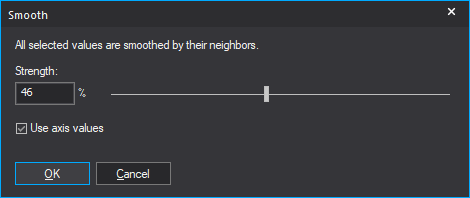
- Edit > Smooth values
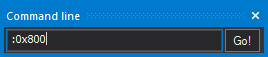
- Window > Command line (dockable dialog)
- Window > Window List (dockable dialog)
- In the Project Open dialog you can use the Options button to assign background colors depending on the project icon
- Data type Float 64
- A map database for the automatic naming of maps: Youtube
Improvements:
- A preview when importing .kp files
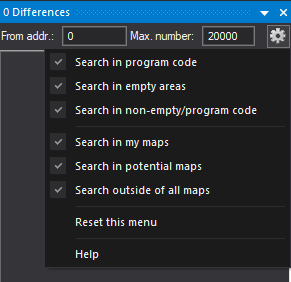
- Differences dialog: New option key with new functions
- Map axis profiles now support groups, so you can assign Map+x+y in one go
- Project properties > Some ECU popup menus contain links to the online dealer locator
New update policy:
There is a lot of development work in WinOLS 5 and we are planning many great features for the future. Therefore, after 20 years of delivering updates and features for free, we have to introduce an annual update fee from now on.
The price of the update to WinOLS 5 includes updates and new features for 1 year. Customers who have purchased WinOLS in the last 6 months will receive the update to WinOLS 5 free of charge.
Compatibility:
- WinOLS 5 requires Windows 10, 64 bit.
- WinOLS 5 supports current EVC hardware like UCM100, BDM100, BSL100, OLS300. Megaprommer MP2240P and OLS16 are no longer supported.
- WinOLS 5 can be installed and used in parallel with WinOLS 4 and uses the same license, i.e. you do not need another license for a WinOLS 5 installation on a computer where WinOLS 4 is already installed. Also the .ols file format remains the same.
Further development:
- WinOLS 4 will continue to be maintained for 2 years, i.e. bugs will be corrected, but no new features will be added.
- All checksums will be updated further, in parallel as 32-bit WinOLS 4 as well as 64-bit WinOLS 5 version.
WinOLS 5 Editor for Tuning Knowledgebase
What are the main benefits of WinOLS 5 over version 4?
WinOLS 5 is a native 64-bit application, allowing for significantly better RAM utilization and faster processing of large SQL databases. It introduces features like "Dark Mode," 64-bit floating-point map support, and configurable search masks for automated map naming. At Mobile Eco Tuning (MET), we recommend the upgrade for tuners working with the latest high-complexity ECUs.
What are the system requirements for WinOLS 5?
You must have a 64-bit version of Windows 10 or Windows 11. It is highly recommended to have at least 16 GB of RAM and an SSD (M.2 preferred) for optimal project database speed. Our technical team at Mobile Eco Tuning uses these high-spec configurations to ensure zero lag during complex remapping sessions.
Can I use WinOLS 5 for DPF and EGR deactivation?
Yes, WinOLS 5 is the industry standard for manually identifying and modifying the switches and maps required for DPF, EGR, and AdBlue deactivation. While it requires technical knowledge to locate these maps, Mobile Eco Tuning (MET) provides the software platform that makes these precision edits possible.
Does WinOLS 5 support J2534 passthrough?
WinOLS itself is an editor, but it works in tandem with VCIs and hardware that support J2534 for file extraction and writing. It natively supports EVC hardware like the UCM100 and BSL100. Mobile Eco Tuning (MET) can help you pair this software with the right hardware for a complete master tuning setup.
How does the new WinOLS 5 SQL database improve workflow?
The SQL database allows for near-instant filtering and searching of thousands of projects, even if they are stored across different drives. This is a massive upgrade for busy tuning files services. Mobile Eco Tuning relies on this architecture to manage their extensive library of tested calibration files.
Will my old WinOLS 4 project files still work?
Yes, WinOLS 5 is fully backward compatible with the .ols file format used in version 4. You can import your entire existing database without losing any version history or comments. Buying from Mobile Eco Tuning (MET) ensures you are getting the most stable, current version of this critical software.
Are checksum modules included with the base WinOLS 5 software?
No, checksum modules are sold as separate plugins depending on the ECU type (e.g., Bosch EDC17, Continental SID208). WinOLS 5 will automatically detect if you have the correct plugin to correct the file after an edit. You can purchase specific checksum credits and modules directly through Mobile Eco Tuning (MET).
Can I run WinOLS 5 on multiple computers?
A standard license is for one workstation within a single company. However, additional licenses can be purchased at a discounted rate for other machines in the same office. Mobile Eco Tuning (MET)’s UK-based support can assist you in managing your license activations as your business grows.
Does the WinOLS 5 support 3D map visualization?
Yes, WinOLS 5 features an advanced 3D preview window that allows you to rotate and analyze maps to identify peaks and inconsistencies easily. This visual aid is essential for professional-grade remapping. The experts at Mobile Eco Tuning use the 3D view to verify smooth torque delivery in their files.
How do I update the software for new WinOLS features?
Updates are handled via an annual subscription model. While the software will continue to function without a subscription, you need an active one to download the latest vehicle definitions and feature updates. Mobile Eco Tuning (MET) provides a direct route for UK customers to renew their EVC subscriptions.
Why should I buy WinOLS 5 from Mobile Eco Tuning (MET)?
We provide official licenses with the benefit of UK-based technical support, meaning no waiting for overseas time zones if you have an activation issue. Furthermore, our company, Mobile Eco Tuning, uses WinOLS 5 every day, so we offer real-world advice on how to get the most out of the editor.
Can I use WinOLS scripts to automate my tuning process?
Yes, WinOLS 5 supports professional scripting, allowing you to apply a set of pre-defined changes to a new file in seconds. This is perfect for repetitive tasks like "Stage 1" base maps. Mobile Eco Tuning (MET) customers often use this feature to drastically increase their daily file output.
Is there a dark mode for late-night tuning?
Yes, WinOLS 5 introduces a highly requested Dark Mode that reduces eye strain during long sessions. It is easily toggled in the settings. This is just one of the user-experience improvements we love at Mobile Eco Tuning (MET) for professional workshop environments.
What hardware is no longer supported in WinOLS 5?
Older hardware like the Megaprommer MP2240P and OLS16 are no longer supported in WinOLS 5 due to the shift to 64-bit architecture. If you are using these, Mobile Eco Tuning (MET) can advise on the best modern EVC hardware to upgrade your station.
Does the WinOLS software help me find maps automatically?
Yes, the "Potential Maps" function uses advanced algorithms to highlight areas of the hexdump that look like maps. However, professional tuners usually supplement this with "Damos" or "Mappacks" for 100% accuracy. Mobile Eco Tuning (MET) is the hub for all the tools you need to build these professional definitions.
Can I pickup a Winols 5 Editor near me?
Yes. If Winols 5 Editor is showing in stock, it is available for collection from our Weston Super Mare store on the same day before 5pm. Next day UK delivery is also available as well as global delivery. Visit https://shop.mobileecotuning.com/shipping for more details
For further technical enquiries, please visit Mobile Eco Tuning.
| Version | Winols5, Winols5 + 20 Points, Winols5 + 50 Points |
|---|---|
| Brand |
Related products


