

Getting ready for MTD isn’t just a tax-software problem, it’s a workflow problem. HMRC’s rules below hinge on where your job and payment data is first captured, not just which accounting package you use at the end. METBooker is built as the upstream layer this guide describes: booking, VRN lookup, digital job cards, POS invoicing, card payments (on your own integrated reader, an external card machine, or cash), refunds, and a full audit trail, all captured once, digitally, at the point of work, with nothing re-typed by hand. Where it’s relevant below, we’ve flagged exactly which part of the compliance picture METBooker covers.
What is MTD for Income Tax and When Does It Apply?
HM Revenue and Customs (HMRC) is replacing traditional annual tax returns with Making Tax Digital (MTD) for Income Tax Self Assessment (ITSA). If you run an independent garage, operate as a mobile remapping technician, work as a DPF specialist, or work as a self-employed mechanic, the way you log daily income and report earnings to tax authorities is changing permanently.
MTD for VAT is already mandatory for all VAT-registered UK businesses. The upcoming ITSA rules apply directly to sole traders and self-employed individuals based on gross annual revenue.
If you are VAT-registered, MTD for VAT brings its own requirements on top of the Income Tax rules below: your invoices must meet HMRC’s conditions for a valid VAT invoice, and the VAT figures must reach your return over a digital link rather than being re-typed. METBooker raises invoices that carry every field a valid VAT invoice needs and passes them to your books over that digital link, so the invoice at the front of the process is already compliant. We cover exactly how in a dedicated companion guide, Does METBooker Produce Valid VAT Invoices?
The Phased Rollout Schedule
MTD for ITSA is being introduced in phases based on your qualifying gross turnover:
| Mandation Phase | Effective Date | Gross Qualifying Income Threshold | Reference Tax Return Assessed |
|---|---|---|---|
| Phase 1 | 6 April 2026 | Gross turnover over £50,000 | 2024/25 Self Assessment Return |
| Phase 2 | 6 April 2027 | Gross turnover over £30,000 | 2025/26 Self Assessment Return |
| Phase 3 | 6 April 2028 | Gross turnover over £20,000 | 2026/27 Self Assessment Return |
If your gross self-employed income stays under £20,000, you are currently exempt and can remain on standard annual Self Assessment filing.
Understanding “Qualifying Income” for Auto Technicians
A critical rule for mechanics is how HMRC defines qualifying income. Qualifying income is your gross revenue before taking off expenses, overheads, or the cost of replacement parts.
In the motor trade, customer invoices often include costly vehicle components alongside billable labour. Under HMRC rules, that full invoice total counts towards your MTD threshold:
If your mobile tuning or repair business bills £52,000 in gross customer invoices across a tax year, but you spend £32,000 on parts, supplies, and fuel, leaving a net profit of £20,000, you are still mandated into Phase 1 starting April 2026 because your gross turnover exceeded £50,000.
If you operate more than one sole-trader activity (for instance, mobile remapping alongside a general repair workshop), HMRC combines the gross turnover of all self-employment trades to determine if you cross the mandatory threshold.
Business Structure Exceptions
- Sole Traders, Mobile Technicians & DPF Specialists: Fully covered by the phased rollout schedule above.
- Limited Companies (Ltd Garages): Exempt from MTD for ITSA. Directors taking salaries and dividends fall under corporate tax rules, which will be addressed under future MTD for Corporation Tax guidelines.
- General Partnerships: Postponed by HMRC pending further evaluation of sole-trader integration.
Core Administrative Changes and MTD Requirements
Moving to MTD replaces end-of-year tax preparation with real-time digital record keeping and regular quarterly submissions.
Daily Upstream Digital Logging
Under MTD regulations published on GOV.UK, keeping physical paper slips in a drawer or relying on handwritten ledgers is no longer compliant. You must record sales and financial transactions digitally as they happen using compatible software.
- Sales & Income Logging: Every customer transaction must capture the invoice/receipt date, total job value, customer details, vehicle details where applicable, and VAT breakdowns.
- Expenses & Purchases: Basic expense logging requires capturing the transaction date, supplier name, gross value, and basic expense category (such as stock purchases, tool leases, or workshop utilities).
For fast-paced over-the-counter retail sales (such as wiper blades, oil cans, or minor bulbs paid in cash), garage owners can elect to use HMRC’s Daily Gross Takings (DGT) rule. This lets you record a single daily cash/card summary total rather than typing in every individual consumable sale, provided daily till or terminal reports are retained.
The Quarterly Reporting Calendar
Instead of one tax filing per year, MTD for ITSA requires four quarterly updates plus one Final Declaration at year-end. The reporting periods and filing deadlines align with standard tax year quarters:
| Reporting Stage | Period Covered | Statutory Filing Deadline | Core Requirement |
|---|---|---|---|
| Quarterly Update 1 | 6 April to 5 July | 7 August | Summary of income and categorised expenses |
| Quarterly Update 2 | 6 July to 5 October | 7 November | Summary of income and categorised expenses |
| Quarterly Update 3 | 6 October to 5 January | 7 February | Summary of income and categorised expenses |
| Quarterly Update 4 | 6 January to 5 April | 7 May | Summary of income and categorised expenses |
| Final Declaration | Full Tax Year | 31 January (following year) | Accounting adjustments, reliefs, and final tax bill |
Quarterly updates provide HMRC with a cumulative summary of your business performance directly from your software. Adjustments for reliefs, capital allowances on workshop tools, and final accounting entries are filed during the Final Declaration by 31 January following the tax year.
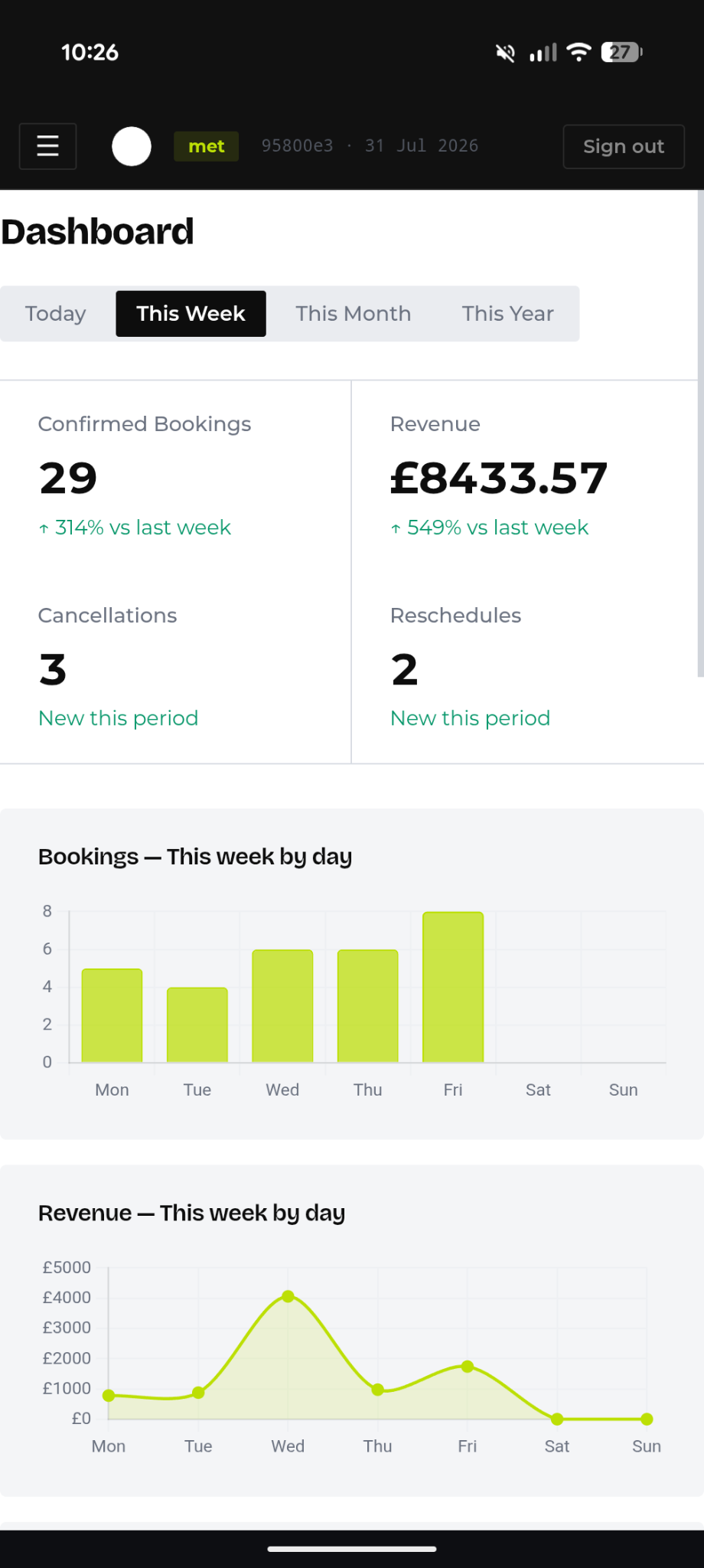
METBooker’s bookkeeping export isn’t just a plain date-range download; it has a built-in “This VAT quarter” preset alongside custom date ranges, so pulling exactly the period HMRC wants for a quarterly update is a couple of clicks, not a spreadsheet exercise. A period-totals summary shows income and VAT for the range before you export, so you can sanity-check the number you’re about to submit. Every export is logged too, so you can always see what was pulled, when, and by whom, useful if your accountant asks “did we already send Q2?”
The “Digital Links” Rule (No Manual Double Keying)
The fundamental technical mandate of MTD is HMRC’s Digital Links Rule. Financial data must move electronically between your booking or invoicing software and your accounting records without manual transcription.
What is strictly prohibited by HMRC:
- Writing job card details onto paper forms and then manually re-typing those figures into bookkeeping software like Xero, QuickBooks, or Sage.
- Copy-pasting invoice numbers or payment amounts across unlinked spreadsheet columns.
What is compliant under HMRC guidance:
- Automated software integrations (APIs) that pass job and invoice data from your booking/scheduling software directly into accounting software, with nothing hand-typed in between.
- Importing structured digital files (like CSV exports) without modifying values manually.
- Direct bank feeds automatically pulling payment transactions into bookkeeping software.
Note: features like VRN lookups, mobile job cards, and shared front-of-house records aren’t part of HMRC’s digital links rule itself, they’re operational tools that help you capture accurate data in the first place, which then needs to move digitally as above.
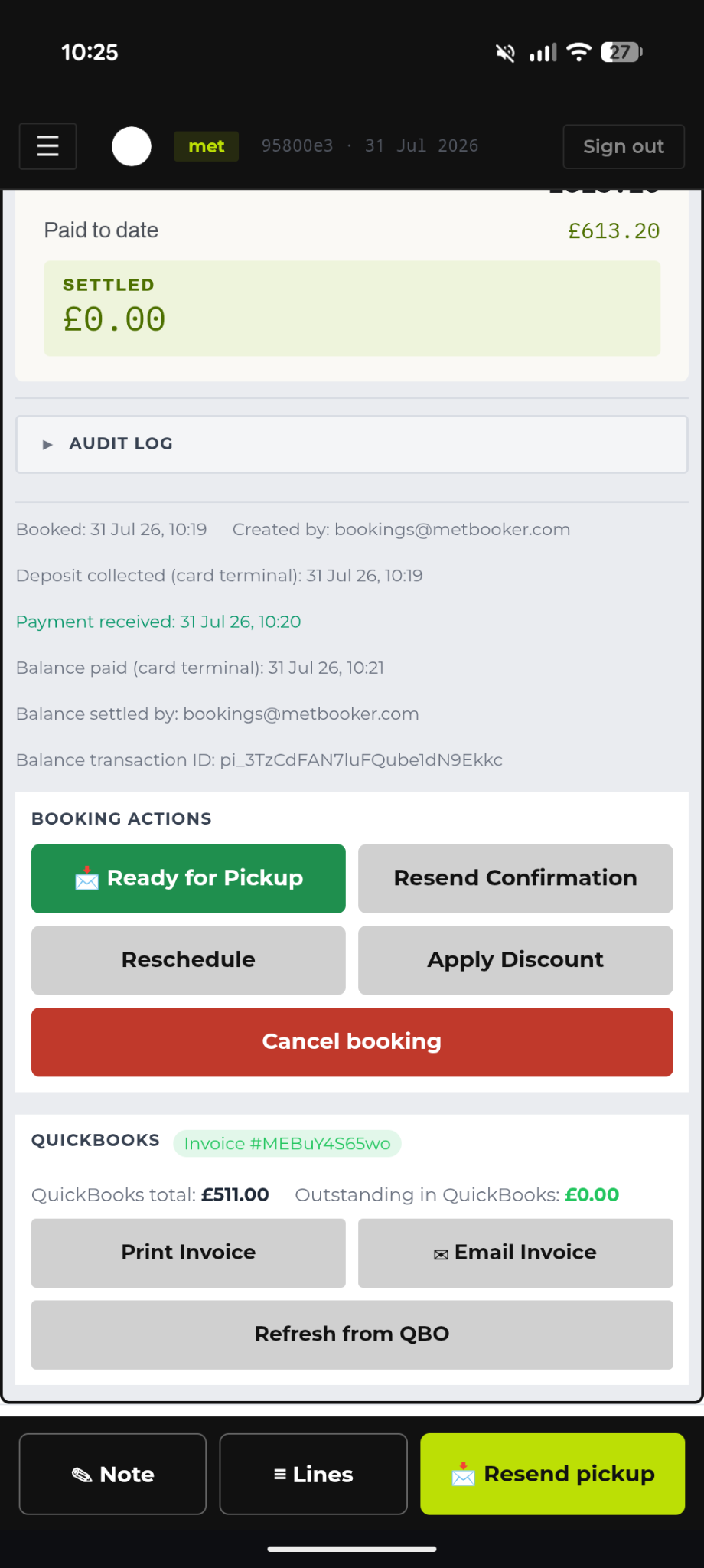
Digital Job Cards Anywhere: Creating Jobs, Taking Payment, and Invoicing On the Move
METBooker runs as an installable app on a phone or tablet, not just a desktop screen in the office. For a mobile technician, remapping ECUs on a driveway, doing a mobile MOT prep, or a one-van operation with no fixed premises, that means the whole job lifecycle happens on the vehicle, in one place:
- Open (or create) the job on the phone, with the vehicle’s details already pulled in from the VRN lookup.
- Update job status and line items as the work happens: labour, parts used, any extra work agreed on site.
- Take payment there and then, by card reader or cash, and generate and send the invoice before you’ve even left the customer’s driveway.
For a small or one-person operation, this collapses what used to be an evening job, writing up the day’s paperwork, working out what was billed, chasing down which invoices went out, into something that’s already finished by the time the van pulls away. There’s no “I’ll log it properly when I’m back at the office” gap for MTD to catch you out on, because there’s only ever one record, created at the point of work.
Front of House, Technicians, and Customers: All Working From the Same Job
Larger operations with a front-of-house desk have a different problem: keeping everyone looking at the same version of the truth. A technician finds an extra fault mid-job and adds a part. Front of house needs to know before they quote or take payment. The customer needs to be told and to approve it. If those three groups are working across three different systems, a workshop whiteboard, a separate till, a phone call to confirm, something eventually gets missed, undercharged, or billed twice.
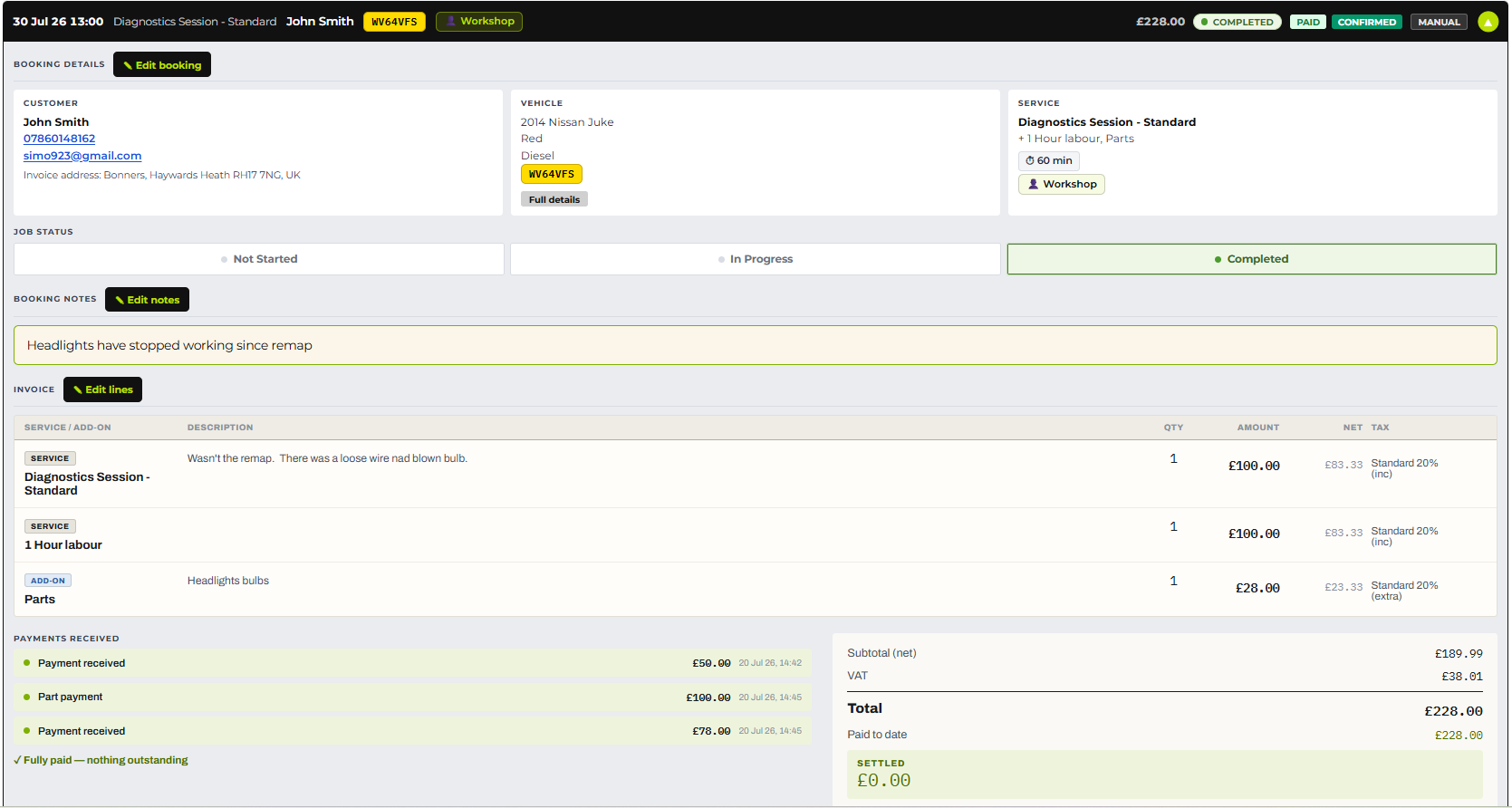
Because everyone on METBooker (technician, front of house, and, via booking confirmations and invoices, the customer) is working from the same job record, an add-on, extra line item, or additional part logged by a technician on the workshop floor is immediately visible to front of house, and reflected in the invoice total before anyone takes payment. There’s no separate system to update and no risk of front of house quoting off an out-of-date job sheet.
Eliminating the Double Keying Trap
Garage owners relying on traditional paper job cards, or a patchwork of separate tools, spend hours at night or over weekends manually re-typing customer billing totals into accounting software. The underlying problem is usually the same one, whatever it looks like day to day: the job gets created in one system, payment gets taken in another, the customer gets updated from a third, and then someone has to manually pull all three together at the end of the week to make the books balance.
| Setup Model | Invoicing & Payment Workflow | MTD Compliance Status | Operational Impact |
|---|---|---|---|
| Paper Job Cards & Re-Typing | Write job notes on paper; manually type totals into Xero, QuickBooks, Zoho, etc | Non-Compliant (Breaches HMRC Digital Links Rule) | High risk of typos; wasted evening admin hours. |
| Disconnected Systems | Create invoice on one tool; copy-paste totals into tax software | Non-Compliant (Manual data transfer) | Admin bottleneck; potential HMRC audit risk. |
| Integrated Upstream Workflow | Digital job card converts to invoice and syncs automatically via API | Fully Compliant (Seamless digital link) | Zero manual re-entry; instant payment tracking. |
By using software tools that handle customer scheduling, VRM lookups, digital job cards, and POS invoicing upstream, the transaction data flows straight through to the general ledger without double keying.
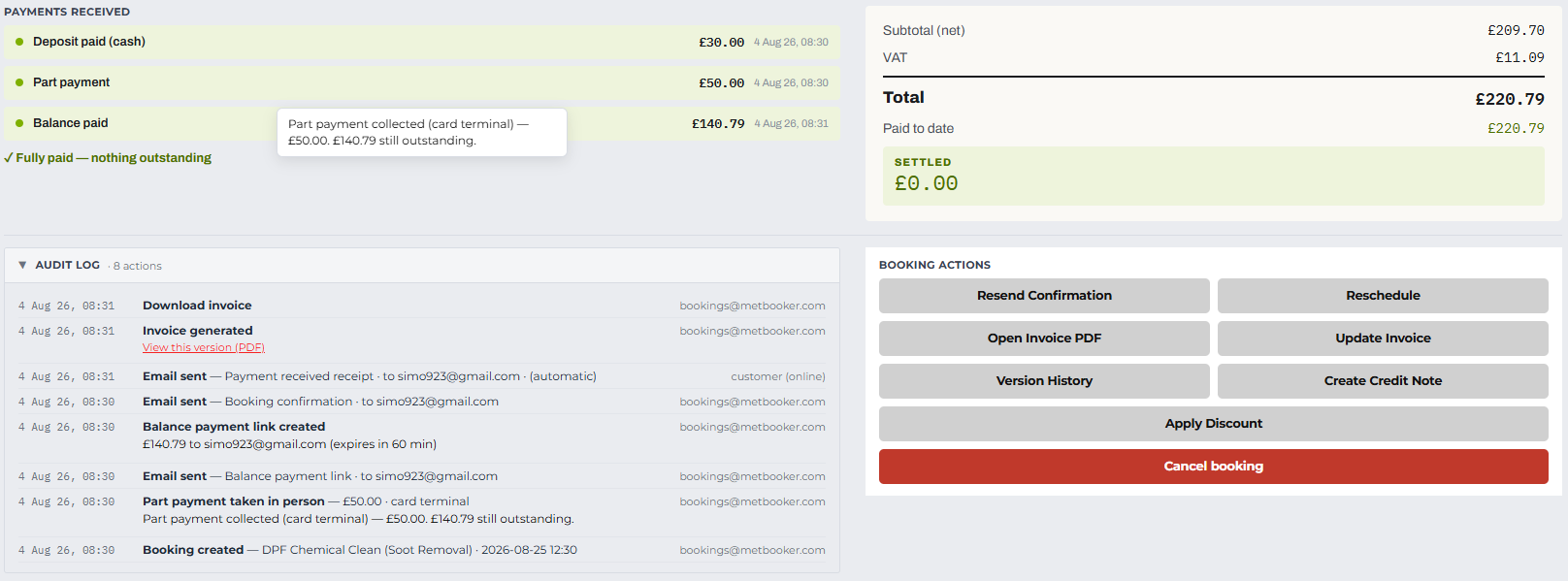
The “Integrated Upstream Workflow” row of the table above is exactly what METBooker delivers out of the box, booking, VRN lookup, digital job card, and POS invoice all live in one system, with card payments (integrated reader, external card machine, or cash), refunds, and split/part payments captured automatically against the job. There’s no job-creation tool, payment tool, and customer-messaging tool to keep in sync by hand: it’s one system that front of house, technicians, and customers all work from. Every action, booking created, payment taken (whichever method), job status changed, refund issued, is written to a central audit log, so if HMRC or your accountant ever asks “prove this was recorded on the day it happened,” you have a timestamped record, not a guess.
HMRC Penalties, Fines, and Non-Compliance Risks
HMRC enforces compliance using a points-based penalty system (under Finance Act 2021) for late MTD filings, treating missed deadlines separately from late tax payments.
The Points-Based Late Submission System
For every missed MTD quarterly update deadline, you receive 1 penalty point from HMRC.
| Filing Frequency | Penalty Point Threshold | Automatic Fine at Threshold | Points Reset Requirement |
|---|---|---|---|
| Quarterly MTD Updates | 4 Points | £200 | 12 months of consecutive on-time filing |
Reaching 4 points triggers an instant £200 fine from HMRC. Every late quarterly filing after reaching 4 points incurs an additional £200 fine. Points do not expire automatically once you hit the threshold. To reset points back to zero, you must submit all updates on time for a continuous 12-month period and clear any backlogged returns.
First-Year Grace Period (Soft Landing)
To help sole traders adjust to MTD for ITSA, HMRC provides a transitional easement: no penalty points will be charged for late quarterly updates during the first tax year (2026/27). However, quarterly updates must still be submitted before filing the end-of-year declaration, and full penalty points apply from 6 April 2027 onward.
Late Payment Penalties and Interest
If tax due is paid late, financial penalties apply on top of submission points under GOV.UK guidelines:
| Days Overdue | Penalty Charge (Full Implementation) | Interest Accrual |
|---|---|---|
| 1 to 15 Days | No penalty if paid or payment plan agreed | Late payment interest accrues daily from Day 1 |
| 16 to 30 Days | 4% of the tax unpaid at Day 15 | Late payment interest accrues daily |
| 31+ Days | 4% at Day 15 + 4% at Day 30 + 10% annual rate accruing daily | Late payment interest accrues daily |
Penalties here are almost always a symptom of records that weren’t ready, not a filing you forgot to click. If every job, payment, and refund is already captured the moment it happens, which is what METBooker’s upstream capture does, pulling a quarter’s figures for your accountant or software becomes a five-minute job instead of a scramble against the 7th-of-the-month deadline.
Modernising Your Workshop: Upstream Workflow Strategy
Achieving seamless MTD compliance does not require changing how you run your workshop floor. The goal is to connect operational front-end software to back-end cloud accounting engines.
The Upstream & Downstream Software Architecture
An efficient digital workflow relies on two complementary layers:
- Upstream Garage Management: Software dedicated to sales and workshop operations, handling customer booking calendars, VRM registration lookups, digital job cards, and point-of-sale invoicing.
- Downstream Accounting: Core bookkeeping engines (such as Xero, QuickBooks, Sage, etc) that handle daily bank reconciliations, expense logging, and direct quarterly MTD transmissions to HMRC.
When upstream tools automatically sync invoice and payment data via API into downstream accounting software, your business maintains an unbroken digital link required by HMRC while keeping shop operations fast and accurate.
Actionable MTD Transition Checklist for Garage Owners
Follow this step-by-step checklist based on official GOV.UK guidance to ensure your business is ready well before your statutory mandation date:
| Phase | Milestone Tasks | Timeline |
|---|---|---|
| Step 1: Review Revenue | Check your 2024/25 gross revenue (parts + labour) on your Self Assessment return to confirm your mandation date (April 2026, 2027, or 2028). | 6-12 months before rollout |
| Step 2: Eliminate Paper | Replace paper job cards with digital booking, VRM lookup, and invoicing workflows. | 6 months before rollout |
| Step 3: Check Integrations | Confirm your front-end customer and job booking tool syncs automatically via API to HMRC-compatible cloud accounting software (Xero, QuickBooks, Sage, etc). | 3-6 months before rollout |
| Step 4: Enable Bank Feeds | Set up automated bank feeds in your bookkeeping software to reconcile POS card reader transactions effortlessly. | 2 months before rollout |
| Step 5: Run a Test Job | Conduct a complete trial run from customer booking to job completion, digital invoice generation, and automated cloud bookkeeping sync. | 1 month before rollout |
Modernising your front-end sales workflow eliminates manual re-keying, satisfies HMRC MTD compliance rules, and gives you clear visibility over daily garage revenue.
Where METBooker Fits: MTD-Ready From the First Booking
It’s worth being precise here, because not everything that helps you run a tidy workshop is something HMRC actually requires. The table below separates the genuine legal requirements under MTD for Income Tax from the METBooker features that support good bookkeeping and make hitting those requirements easier. Both matter, but they’re not the same thing, and a garage owner (or their accountant) should be able to tell which is which.
The genuine HMRC requirements, and how METBooker supports them
| MTD Requirement (HMRC) | METBooker Capability |
|---|---|
| Keep digital records of income and expenses, showing the date, amount, and category for each transaction | Booking + digital job card captures date, customer, vehicle, and job value the moment work is scheduled or completed, stored digitally throughout |
| Maintain a digital link between systems, no manual re-keying or copy-paste of totals | QuickBooks Online API (other API’s supported on request) integration syncs invoices automatically; for tenants without QBO, the CSV export is built to import directly into Xero, Sage, Zoho, etc rather than requiring figures to be re-typed |
| Submit quarterly updates of income and expense totals to HMRC via compatible software | Built-in “This VAT quarter” export preset and period-totals summary, so pulling a quarter’s figures for your accounting software takes minutes |
| Submit a Final Declaration after the tax year end | Not a METBooker function. This is filed from your accounting/MTD-compatible software, which is where the numbers ultimately land |
| Applies once qualifying gross income crosses the relevant threshold (£50,000 from April 2026, £30,000 from April 2027, £20,000 from April 2028) | Not applicable to METBooker as a platform feature; this determines whether a given garage or technician is in scope at all |
METBooker is not itself HMRC-recognised MTD submission software. It doesn’t file quarterly updates or the Final Declaration to HMRC. What it does is produce clean, accurate, digital records at the point a job is booked and paid, and pass them, via the QBO API or a structured export, into software that does the filing. That’s the “digital link” piece of the chain, not the whole chain.
METBooker features that support good bookkeeping (useful, but not MTD legal requirements)
Everything below makes running the business easier and helps produce accurate records, but none of it is mandated by HMRC. Worth knowing the difference if this ever comes up with a customer or their accountant.
| Feature | What it’s actually for |
|---|---|
| Automatic VRN lookup pulling vehicle details from DVLA | Reduces data entry errors and speeds up job creation, an operational convenience rather than a tax rule |
| Job card converts directly into a POS invoice | Reduces duplicate entry and human error, good practice rather than something HMRC mandates |
| Payments recorded and tagged by method (integrated reader, external card machine, cash) | Supports accurate reconciliation, general bookkeeping hygiene rather than an MTD rule |
| Mobile/PWA support for technicians working on the move | Operational convenience for mobile or one-van trades, unrelated to tax law |
| Shared job record visible to front of house and technicians in real time | Reduces invoicing errors from miscommunication, an internal process control |
| Native split/part-payment tracking against a booking | Supports accurate revenue recognition, not an HMRC-mandated feature |
| Built-in refund handling, including QuickBooks-aware/API integrated accounting part-refund logic | Keeps refunds correctly reflected in your accounts, good practice rather than a legal requirement |
| Central audit log of bookings, payments, refunds, and status changes | A useful evidence trail if HMRC or your accountant ever queries a figure, but not itself a mandated audit-log format |
If you’re an independent garage, mobile technician, or DPF specialist working through the transition checklist in Section 5, METBooker is designed to produce accurate, digital, audit-ready records and pass them cleanly into your MTD-compatible accounting software, whether you’re a one-person mobile operation invoicing from the driveway, or a full workshop with front of house, technicians, and customers all working from the same job. The statutory filing itself still happens in your accounting software; METBooker’s job is to make sure what lands there is accurate and never hand-typed.
- Making Tax Digital for Income Tax — HMRC Guide — makingtaxdigital.campaign.gov.uk
- Making Tax Digital for Income Tax Self Assessment for sole traders and landlords — gov.uk
- Making Tax Digital for Income Tax — gov.uk
- Find out if and when you need to use Making Tax Digital for Income Tax — gov.uk
- Making Tax Digital for VAT is coming, are you ready? — gov.uk
- How does Making Tax Digital work — HMRC Guide — makingtaxdigital.campaign.gov.uk
- Choose the right software for Making Tax Digital for Income Tax — gov.uk
- Quarterly updates for Making Tax Digital — HMRC Guide — makingtaxdigital.campaign.gov.uk