

If your garage or mobile business is VAT-registered, one question matters before you trust any front-of-house system with your billing: are the invoices it raises actually valid VAT invoices in HMRC’s eyes, and do they still drop cleanly into your accounting software? It is a fair question. A booking tool that produces something that looks like an invoice but is missing what HMRC requires just creates work later, or worse, a problem at a VAT inspection.
This guide walks through what makes a VAT invoice valid under UK law, clears up a common misconception about where invoice numbers have to come from, and shows how METBooker raises compliant VAT invoices at the point of work and hands them to your books over a proper Making Tax Digital (MTD) digital link. It is the companion to our Making Tax Digital guide, which covers the wider MTD picture for Income Tax and VAT.
METBooker produces valid VAT invoices and MTD-ready digital records, and gives you a compliant digital link into your accounting software. It is not accounting software and it does not file your VAT return. The filing stays with you, your accountant, or your bookkeeping platform. That distinction matters, and we keep to it throughout.
What HMRC Requires on a Valid VAT Invoice
A VAT-registered business must issue a proper VAT invoice for standard-rated or reduced-rated supplies to another VAT-registered customer, and it is good practice to issue one for every job. HMRC sets out exactly what a full VAT invoice must show. Miss a required field and it is not a valid VAT invoice, which can affect your customer’s right to reclaim the VAT and your own records at inspection.
The Full VAT Invoice Checklist
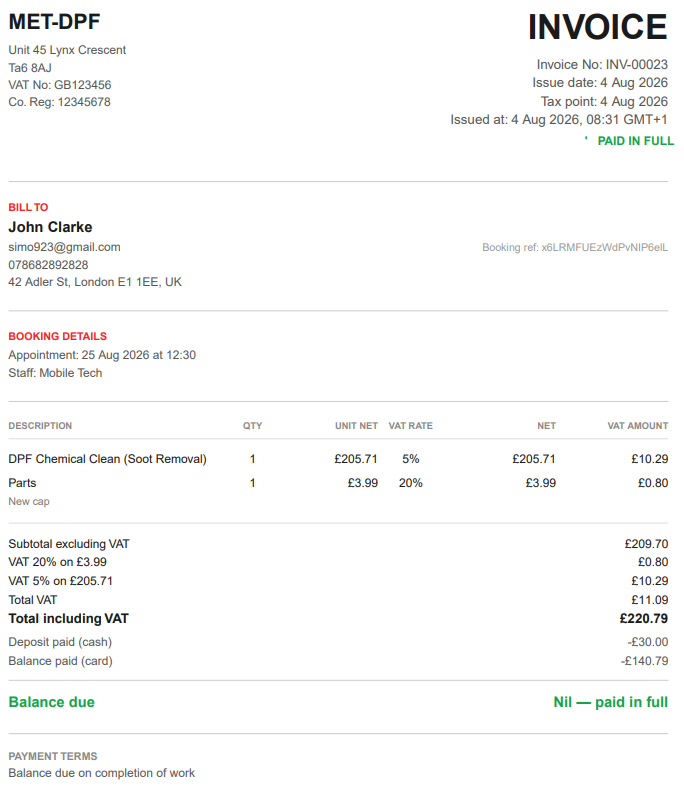
Under HMRC guidance (VATREC5010 and the GOV.UK invoicing rules), a full VAT invoice must include:
- A unique, sequential invoice number that identifies the document
- Your business name and address
- Your VAT registration number
- The invoice date
- The time of supply (the tax point), where it differs from the invoice date
- The customer’s name and address
- A description of the goods or services supplied
- For each line: the quantity, unit price excluding VAT, the VAT rate applied, and the line total excluding VAT
- The total amount excluding VAT
- The total VAT amount, shown in sterling
- The rate of any cash or settlement discount offered
- The total amount including VAT
For low-value retail sales (a total including VAT of £250 or less, think a set of wiper blades or a bulb over the counter) HMRC allows a simplified VAT invoice with fewer fields: your name, address and VAT number, the tax point, a description, and the total including VAT with the VAT rate for each item.
METBooker’s invoices are built to carry the full-VAT-invoice fields above. Your business name, address and VAT number come from your tenant profile, so every invoice is stamped with them automatically. Each line shows its description, quantity and price, and where a booking or item stores a VAT rate, the invoice shows the net, the VAT and the gross with that rate applied. The invoice date and the job’s tax point are captured the moment the work is booked and completed, not reconstructed later. In short, the compliant VAT invoice is produced at the point of sale, not stitched together afterwards.
The Misconception: “My Invoice Number Has to Come From My Accounting Software”
This is the single most common thing garages get wrong, and it is the key to simpler invoicing. Many owners assume that to be valid, an invoice number has to be generated by Xero, Sage or QuickBooks. It does not.
HMRC’s only requirements for the number are that it is unique and drawn from a sequential series that identifies the invoice. Beyond that:
- The series can be numbers, or a mix of numbers and letters (for example INV-00042)
- It can start at any point, it does not have to begin at 1
- You can run more than one series at once, provided each is distinct
- A break in the sequence is acceptable if the spoiled or cancelled invoice is retained, or the break can be explained
In other words, the accounting platform is the ledger that records your invoices, not the tool that has to originate them. Invoicing from your operational system and recording the result in the books is a normal, accepted pattern. This is what lets METBooker raise the invoice where the work actually happens.
METBooker issues invoices from its own sequential series (for example INV-00042), auto-incrementing and checked for uniqueness so you never get a duplicate or a clash. That series is a valid HMRC VAT invoice series in its own right. You raise the compliant invoice at the counter or on the driveway; your accounting software simply records it. The practical payoff: no waiting to be back at the office to “create the real invoice in Xero”, and no second numbering system to keep straight.
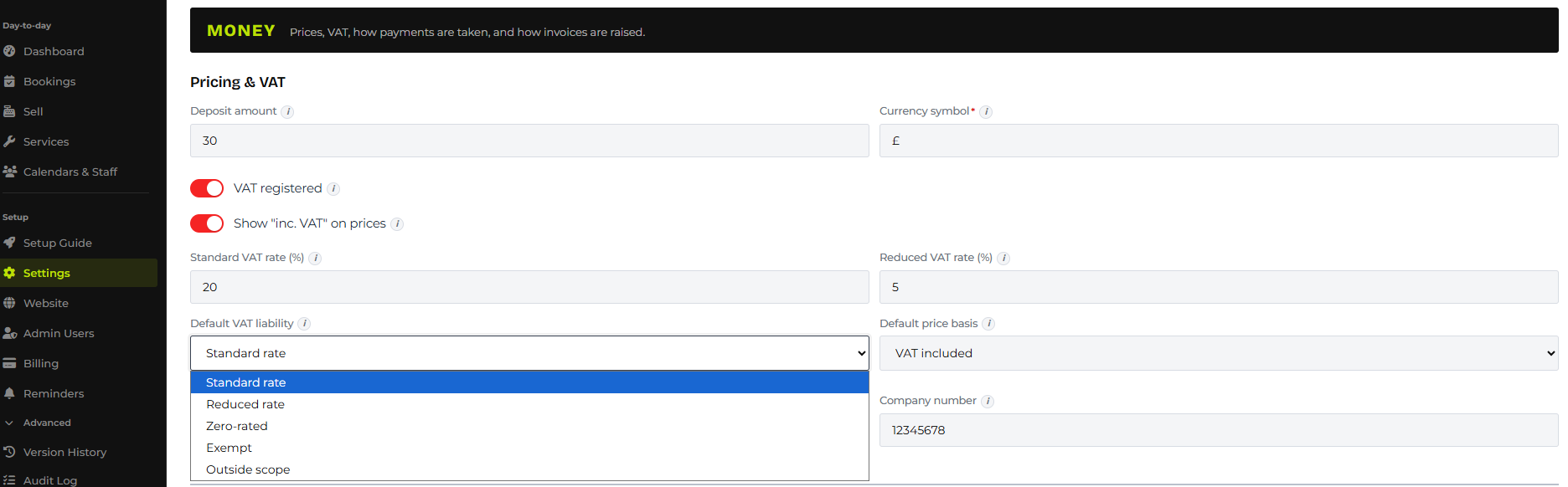
One housekeeping point: if you also raise invoices somewhere else (a separate pad, or another tool), keep the series apart. HMRC permits multiple concurrent series, so giving each a distinct prefix keeps them from colliding. The simplest path is to let METBooker be your single invoicing tool.
MTD for VAT: The Digital Link From Invoice to Return
MTD for VAT is already mandatory for all VAT-registered UK businesses. It requires two things: your VAT records must be kept digitally, and the data must move between systems over a digital link, with no manual transcription, all the way through to the software that files your return.
HMRC’s VAT Notice 700/22 is explicit about what counts as a digital link, and it is the crux of the whole thing:
- Accepted digital links include automated software integrations (APIs), and importing or exporting structured files such as CSV, without changing the values by hand
- Copy and paste, or cut and paste, is explicitly not a digital link. Nor is re-typing figures from a paper invoice into your books
So a VAT-registered workshop realistically has two compliant options: a live-sync integration, or a structured export imported into the books. Manually re-keying each sale is both slow and, under the digital-links rule, not compliant. And your VAT records (invoices included) must be kept for at least 6 years.
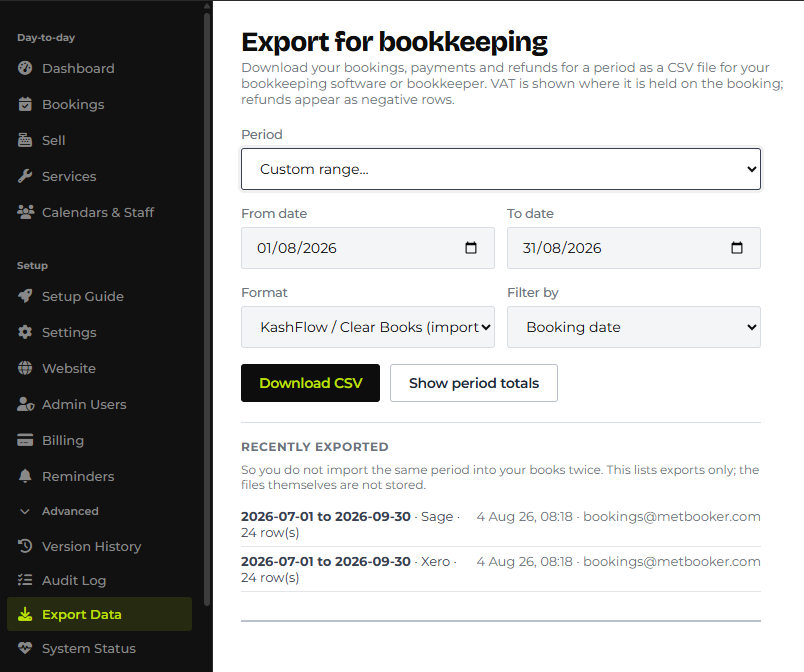
METBooker gives you both compliant routes. For QuickBooks Online or API connected tenants, confirmed invoices and payments sync to the ledger automatically over the API, with no manual re-entry. For any other platform, METBooker’s export produces clean, structured CSV files (with Xero and Sage and other popular platform presets, or a universal format) ready to import straight into your books, the “importing structured files without modifying values” route HMRC explicitly allows. Either way, the VAT figures travel from the invoice to the return without anyone typing them twice. And because every invoice, payment and refund is stored digitally in METBooker, the records you have to keep for six years are already retainable, not a shoebox.
How This Actually Simplifies Invoice Generation
Put the three facts together and the day-to-day simplification is real:
- METBooker raises a valid VAT invoice at the point of work, carrying every field HMRC requires.
- Because the invoice number is METBooker’s own, there is no second step of “recreating” the invoice in your accounting software.
- The invoice reaches your books over a compliant digital link, by live API sync or a structured export, so the VAT is recorded once and only once.
For a VAT-registered garage, that collapses the old routine (write the job up, raise a paper or PDF invoice, then re-key the whole thing into the books before the VAT return) into a single record created when the job happens. For a mobile technician, the compliant VAT invoice can be generated and sent from a phone before you have left the customer’s driveway.
METBooker Against the VAT Requirements, Field by Field
| VAT / MTD Requirement | METBooker Capability |
|---|---|
| Unique, sequential invoice number | Own INV series, auto-incrementing and uniqueness-checked; a valid HMRC VAT invoice series in its own right |
| Supplier name, address and VAT number on every invoice | Pulled automatically from the tenant profile onto each invoice |
| Customer details, description, and per-line net / VAT / gross with the rate | Captured on the job and shown on the invoice where the item stores a VAT rate |
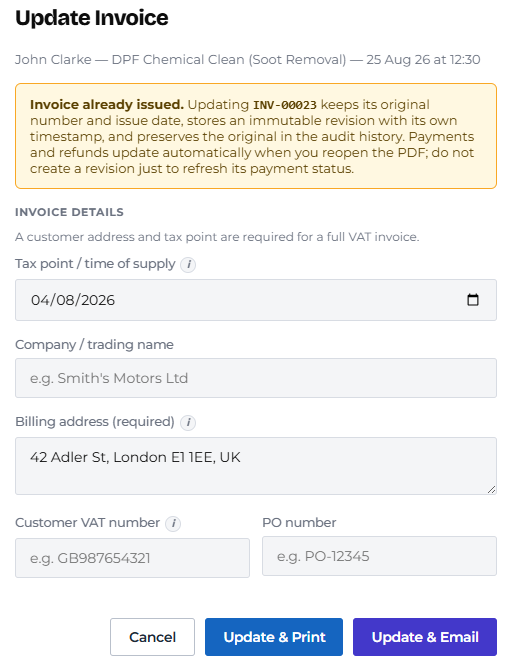
| Invoice date and tax point | Stamped when the job is booked and completed, not reconstructed later |
| Simplified VAT invoice for low-value retail sales | Point-of-sale counter sales suit the simplified-invoice route for items £250 or under |
| Deposits, part-payments and balances tracked correctly | Native split and part-payment tracking against every booking. Run the recommended setup, QuickBooks Online sync, or invoice-on-deposit switched on for native invoicing, and the deposit invoice is raised and dated the moment the money lands, creating the tax point on receipt rather than later |
| Refunds recorded correctly | Refunding a kept booking automatically issues a linked VAT credit note referencing the original invoice, no extra steps. Refunding a cancelled, already-invoiced booking takes one extra click: raise the credit note from the invoice first, using the same sequential series, before you refund |
| Digital link to the books (no manual transcription) | Live QuickBooks Online API sync, or structured CSV export (Xero, Sage, or universal) for the platform of your choice |
| Pull a VAT period for the return | Built-in “This VAT quarter” export preset and a period-totals summary to sanity-check before you export |
| 6-year VAT record retention | Every invoice, payment and refund stored digitally and retainable; a central audit log timestamps each one |
A Few Things to Get Right (Process, Not Product)
These are the housekeeping points worth knowing, they are about clean process, not gaps in the software:
- Switch on invoice-on-deposit if you’re VAT-registered and not on QuickBooks Online. This is what puts the tax point on the day the deposit lands rather than the day the job finishes. It’s a one-minute setting, ask us to turn it on if you’re not sure it’s already active on your account.
- Cancelling an already-invoiced, paid booking: raise the credit note before you refund. A kept-booking refund does this for you automatically. A cancellation currently needs one extra step, raise the credit note against the original invoice from the invoice screen, then process the refund. It uses METBooker’s own sequential credit-note series and keeps the reference back to the original invoice, so it is just as valid as one issued automatically. On QuickBooks Online, a cancellation currently records the refund itself in your ledger; if your accountant wants a formal credit memo against the original invoice too, raise that directly in QuickBooks. We’re working on making both of these automatic.
- Export clean, non-overlapping periods. If you export and import an overlapping range, you double-count. Use the quarter or month presets and, if in doubt, check the period-totals summary before importing.
- Keep one invoicing tool. Let METBooker be the single source of your invoice series, or give any other series a distinct prefix so numbers cannot clash.
- Reconcile against the bank feed in your accounting software. Card settlements arrive net of fees and in batches, so the invoice shows the gross sale while the bank shows the net payout. That matching is done in the books as normal; METBooker’s provider transaction IDs help you tie them up.
- Account codes and tax rates are a one-time mapping. The bookkeeping export presets leave those columns for you or your accountant to set once, because only you know your chart of accounts.
The Bottom Line for VAT-Registered Businesses
METBooker raises invoices that carry everything HMRC requires of a VAT invoice, numbers them from its own valid sequential series so you are not tied to generating them in your accounting package, and delivers them to your books over a digital link that satisfies MTD for VAT. The result is one record, created when the work happens, that is compliant at the point of sale and ready for your VAT return without being typed twice.
METBooker does not file your VAT for you, and it is not your accounting software. What it does is make sure the invoice at the front of the process is valid, digital and linked, so the return at the back of the process is straightforward. For a VAT-registered garage or mobile technician, that is the difference between invoicing being a compliance risk and invoicing being a solved problem.
- VAT Notice 700/22: Making Tax Digital for VAT (digital links; CSV import/export accepted, copy and paste not) — gov.uk
- VATREC5010: Details which must be shown on a full VAT invoice — gov.uk
- Invoicing and taking payment from customers: what invoices must include — gov.uk
- Record keeping (VAT Notice 700/21): 6-year VAT record retention — gov.uk
- Charge, reclaim and record VAT: keeping VAT records — gov.uk